In-app feedback vs email. Where should you ask users?
Choose when to ask for feedback inside your product and when to use email, with sample questions and a practical first test.
Ask inside your product when the question concerns something the person is using. Use email when you need to reach someone who may not return, arrange a longer conversation, or share details they need outside your app.
Bopmigo helps you start a feedback conversation on your website and keep the answer with the page where it happened. You can also reply by email when the person’s email address is provided.
How do I get feedback from users who don’t reply to emails?
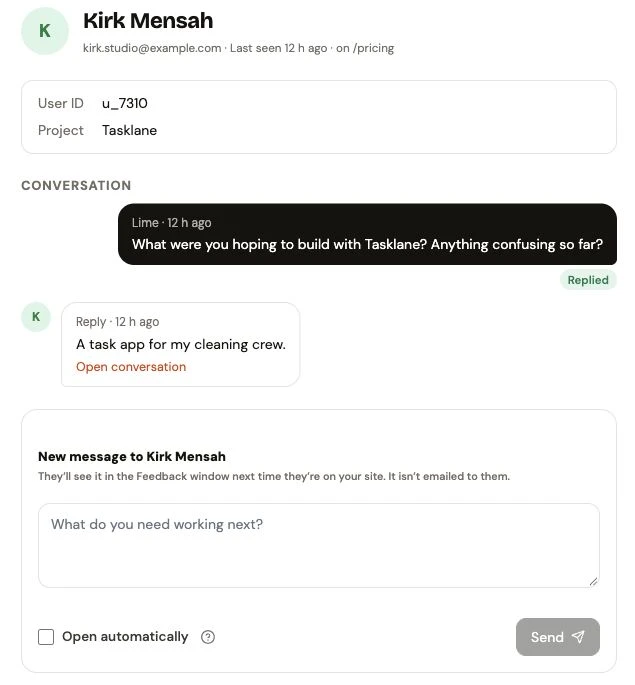
Ask a focused question inside the product while they are using it. Bopmigo lets your team start that conversation on your website, so people can answer in the same place they are working.
- Connect your website and identify signed-in people through the integration.
- Open People, choose the person and send one relevant question.
- Read their reply in your inbox and continue the conversation.
When an in-app question helps
A person has just tried assigning a job in Tasklane. “What would help you assign the next job to your crew?” gives them something specific to answer while the task is familiar.
That is a different question from “Any feedback?” sent several days later. It names the task and the detail your team needs.
In-product messages are useful for questions about a screen, a confusing step, a feature request or a change someone can try. They still depend on the person visiting the product and choosing to answer.
When email helps
Email can reach someone who is no longer using the product. It also suits interview invitations, longer explanations and a conversation someone wants to find in their inbox.
If a trial user has not returned, an in-product message alone cannot bring them back. Choose the channel based on where the person can receive and use the question.
Write a question someone can answer
For a new feature, try “What would help you plan your crew’s work?”
For an unclear step, try “What stopped you from assigning the job?”
After a verified fix, try “Can you assign the job to your crew now?”
Keep the question focused on the person’s task. Read any earlier feedback first so you do not ask them to repeat it.
Try a small feedback conversation with Bopmigo
Test the conversation with a teammate before choosing your first customer question.
Open the website in the same browser used for the test person, check how the message appears, reply and confirm the conversation reaches your inbox.
See how messaging works. For replying to an existing report, follow the reply guide.
Measure what helps your team
Record how many people received, opened and answered the question, where those states are available. Then review whether their answers helped you decide what to change. A reply is useful when it clarifies the task, explains an obstacle or tests an assumption.
Compare like-for-like questions before deciding that one channel works better for your users. Your audience, timing and question affect the result.