What is a feedback widget? Definition and examples
A small button or panel on a website or app that lets people report a problem, ask for something or share an idea without leaving the page.
Feedback widget: A small button or panel on a website or app that lets people report a problem, ask for something or share an idea without leaving the page.
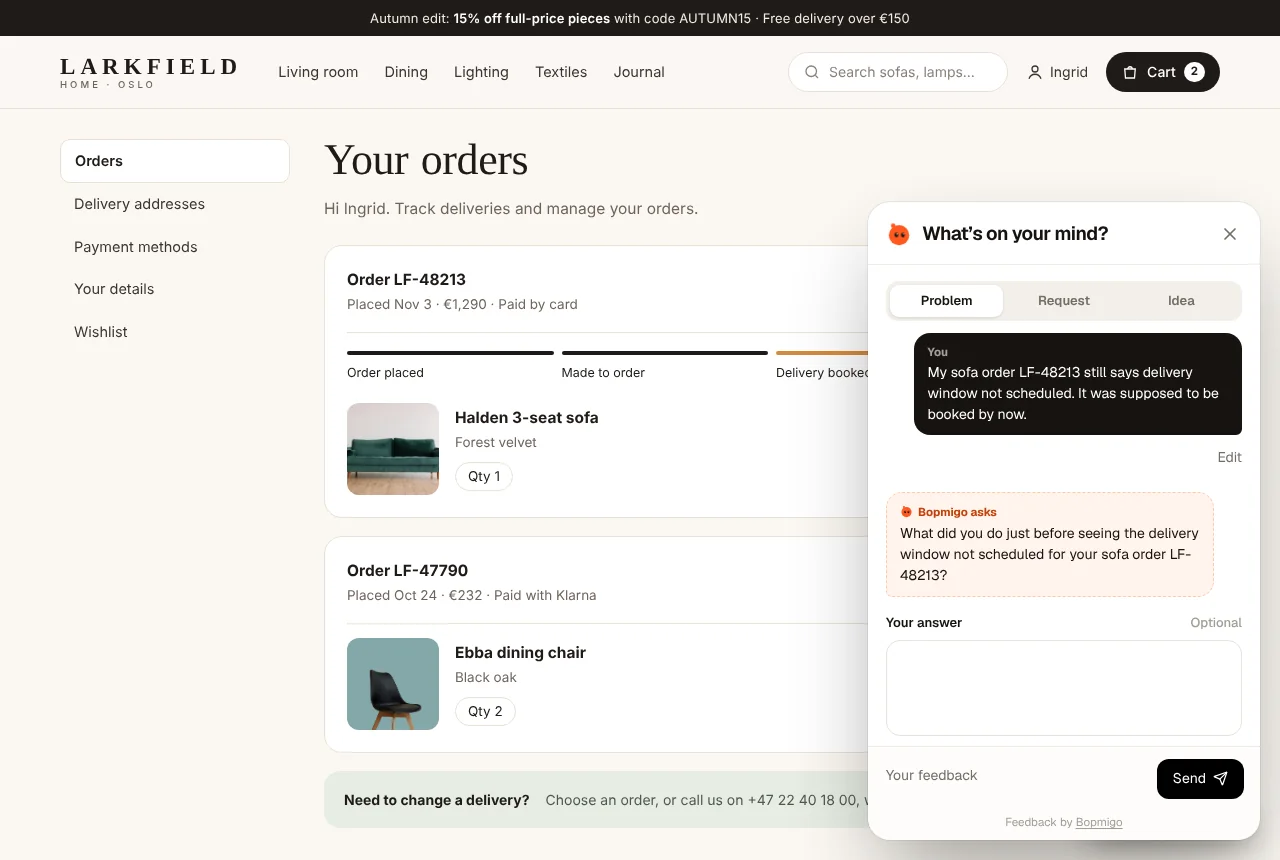
Feedback widgets usually sit in a corner of the page. When opened, they show a short form, and many attach the page address, browser details and a screenshot automatically.
Unlike a contact form, a widget is available on every page and knows where the person was when they wrote.
Example
| Part | Example |
|---|---|
| Button | “Feedback” in the bottom corner |
| Form | Problem, Request or Idea, and a line of text |
| Attached for them | Page, browser, screenshot |
What a good feedback widget does
- Stays out of the way until someone wants it. A small button in a corner, never a pop-up that blocks the page.
- Asks for very little. A type (problem, request, idea) and a line of text. Every extra field loses people.
- Attaches what people can’t easily describe: the page, the browser and a screenshot.
- Protects privacy by default. Typed-in fields and card numbers are covered before anything leaves the browser.
- Lets you answer. A reply that reaches the person where they reported closes the loop.
Feedback widget vs survey vs contact form
| Feedback widget | Survey | Contact form | |
|---|---|---|---|
| Who starts it | The person, when something happens | You, on a schedule | The person, usually after the fact |
| Context attached | Page, device, screenshot | Usually none | Usually none |
| Best for | Bugs, requests, confusion in the moment | Satisfaction and trends | Sales and account questions |
Where to put it
Bottom right is the convention, so people know where to look. On pages with a chat bubble, move one of them or open the widget from a menu link instead. In apps, a Send feedback item in Settings or the help menu works well, plus a prompt after a screenshot for testers.
Where Bopmigo fits
Bopmigo is a feedback widget for websites and web apps, with the same experience inside iPhone and Flutter apps.
Questions
Is a feedback widget the same as live chat?
No. Chat is a live conversation; a widget collects a report you answer when ready. See widget vs live chat.
Will a feedback widget slow down my site?
A well-built one loads after your page and only fetches the form when opened, so visitors don’t notice it.
Do visitors need an account to use it?
They shouldn’t. Requiring sign-up before feedback loses most reports.